Mirklurk: Every Step Matters Controls and Action Points
Master AP, mouse play, zoom, and rotating attack patterns.
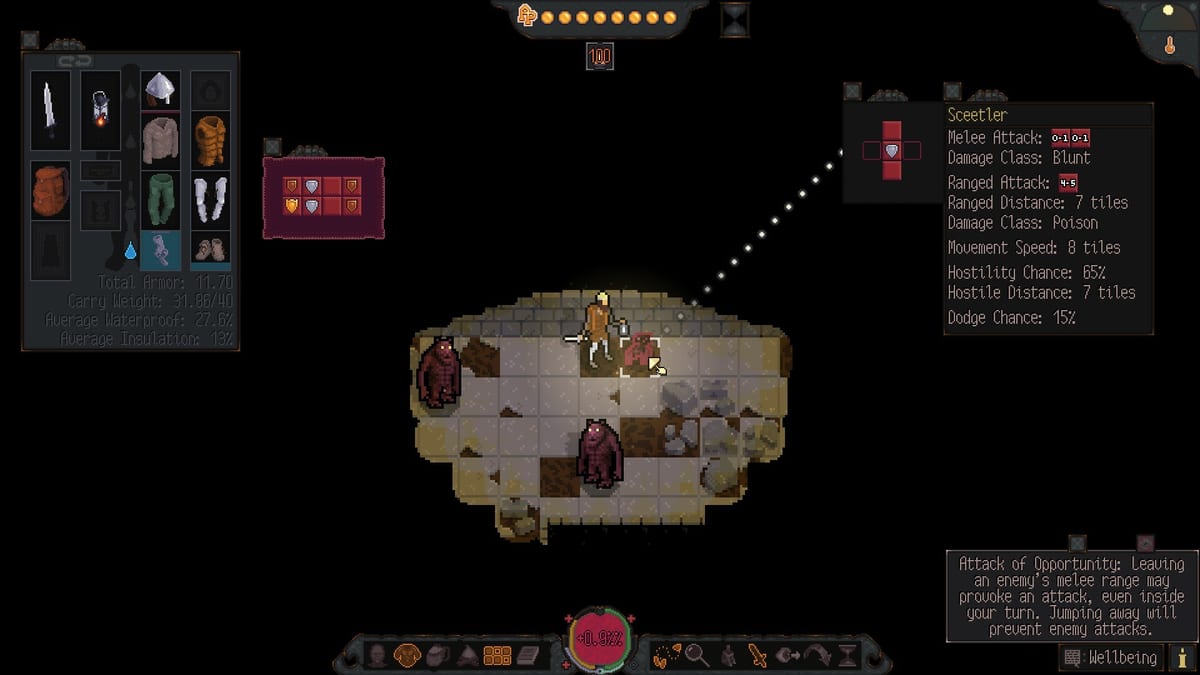
Mirklurk: Every Step Matters is easier to love once the controls and Action Point economy feel natural. This guide explains the eight AP per turn rule, how movement and interactions spend that budget, mouse-driven play, middle mouse zoom, right-click attack rotation, and why slopes and rough tiles punish careless pathing. Read it early; every other guide assumes you can spend AP on purpose.
The Action Point economy
Each turn grants 8 Action Points. Almost everything meaningful costs AP:
- Stepping to a new tile
- Climbing slopes (often more expensive)
- Attacking with a weapon pattern
- Using items and tools
- Critical camp and craft interactions
AP is the shared currency of travel, work, and violence. Spending seven points on a scenic ridge walk means you may lack the eighth point mindset—and the remaining budget—to build a fire when night lands. That is not a UI quirk; that is the game’s thesis: Every Step Matters.
Passing turns and recovery
If you pass a turn while still holding full AP, you can support Energy/stamina recovery patterns. Use this when you are safe, meters need a pause, and wandering would only dig the hole deeper. Do not AFK in the open at dusk and call it strategy—pair waits with shelter logic from Camping.
Mouse movement and world interaction
Mirklurk plays primarily through mouse interaction: select tools, click destinations, inspect enemies, and confirm actions inside the turn structure. Before you deep-dive into The Mirk:
- Learn how to select the active tool or weapon.
- Watch the AP preview on potential moves when the UI shows costs.
- Hover or inspect enemies to read grids when combat starts.
- Cancel greedy clicks when the AP math no longer supports a camp plan.
Precision beats spam. Misclicks in a turn-based swamp still spend real turn resources.
Zoom with the middle mouse wheel
Use the middle mouse wheel to zoom. Grid HP combat and careful camp placement both benefit from readable cells and tiles. If you cannot see whether an attack pattern overlaps the cells you care about, zoom before you commit AP. Many “the combat is unfair” moments are actually unread shapes on a small view.
Zoom tips:
- Zoom in for armor placement and pattern alignment.
- Zoom out for route planning across swamp ridges and water edges.
- Re-zoom whenever you switch from travel brain to fight brain.
Right-click rotate attacks
Weapons strike in geometric patterns. Right-click rotates the orientation of that pattern so you can match the enemy’s HP grid. This is mandatory literacy, not an advanced trick.
Rotation workflow:
- Select the weapon.
- Preview the pattern against the target grid.
- Right-click to rotate until overlap hits dense HP or breaks key armor.
- Spend AP on the strike only after the orientation is correct.
Combine rotation with damage-class knowledge from the Combat Guide: a perfectly rotated Force hit that also nicks adjacent cells can outperform a higher “power” swing aimed at empty edge cells.
Slopes, wetlands, and hidden AP taxes
Not all tiles cost the same. Slopes cost more AP. Wetlands and awkward approaches can also turn a “short” path into a budget crisis. When you plan a route to a merchant, ruin, or camp:
- Count the expensive tiles, not just the crow-flies distance.
- Prefer slightly longer flat paths if they preserve setup AP.
- Remember you need arrival AP for fire, food, or a first combat turn.
This is why heavy armor and overstuffed inventories feel worse than their combat stats suggest—they amplify movement pain on taxed terrain. See Crafting for loadout swaps.
Combat control checklist
When a fight begins:
- Pause and identify the enemy.
- Place armor points on predicted impact cells.
- Zoom in.
- Choose the weapon whose shape fits the grid.
- Right-click rotate for best overlap.
- Confirm you will have AP left for a follow-up or escape plan.
- Consider dodge shifts if a lethal pattern is incoming.
If Focus or Warmth are already failing, remember that controls skill cannot replace meter management—Survival.
Travel control checklist
- Check meters.
- Select the travel-appropriate kit (light for Warmth/climbing).
- Zoom out, eye the path, note slopes.
- Move in chunks that leave setup AP.
- Reassess at each handcrafted landmark.
- Commit to camp before night taxes vision and temperature.
UI reading habits that save runs
- Watch AP before confirming multi-step ambitions.
- Watch Warmth when rain starts—controls do not stop weather.
- Watch enemy grids as carefully as your own.
- Watch tool selection; swinging the wrong item is an AP donation.
Turn-based games forgive reaction time but punish planning blindness. Mirklurk sits in that tradition with survival meters glued on.
Accessibility and comfort
If patterns are hard to see, zoom more and fight in better lighting conditions when possible—bring torches into dark caves rather than squinting. If you play on Steam Deck or a small screen, make zoom part of every combat open. Remap only after you understand the default intents: move/act with AP previews, rotate patterns, zoom to read cells.
Practice drills
Spend a safe morning doing drills instead of greed runs:
- Walk a loop that includes one slope and count AP spent versus flat ground.
- Enter a trivial fight solely to practice three rotations of the same weapon.
- Zoom in, place armor, zoom out, leave without looting if dusk is close.
These drills make Early Game Tips habits automatic.
How controls connect to the rest of the wiki
- Getting Started — when to use these inputs in the first hour
- Combat — why rotation and zoom matter on grids
- Camping — what you must still afford after the walk
- Survival — why passing turns and rushing both have meter costs
Master controls until AP spending feels like speaking a language. Then The Mirk becomes a conversation you can win one careful turn at a time.
Frequently Asked Questions
Quick answers for surviving The Mirk.
How many Action Points do I get per turn?
You get eight AP per turn. Movement, attacks, items, and many interactions spend from that shared pool.
How do I zoom the camera?
Use the middle mouse wheel to zoom in for grid readability and out for route planning.
How do I rotate weapon attack patterns?
Right-click to rotate a weapon’s geometric attack pattern before you commit the AP to strike.
Why do some moves cost more AP?
Terrain matters. Slopes in particular cost more AP, so short uphill paths can exhaust your turn budget.
Should I ever pass a turn on purpose?
Yes, when you are safe and need Energy recovery while holding full AP. Do not pass away your last chance to build a fire at night.